


Web Menu Configuration
Press the [Settings] operation screen switching tab to display the settings screen.
Use the settings screen to configure the various setup items of the unit, including initial settings, network settings, shooting/playback settings using the web menu.
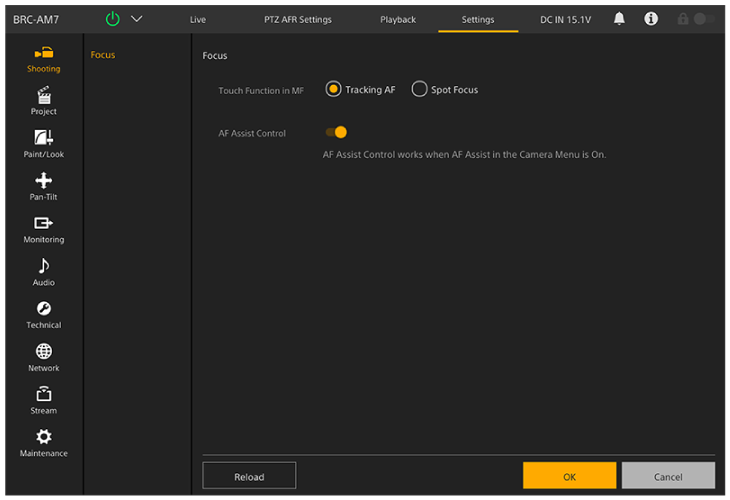
The menu comprises the following menus.
Menu configuration and hierarchy
| Level 1 | Level 1 description | Level 2 |
|---|---|---|
| [Shooting] | Contains settings related to shooting. | [Focus] |
| [Project] | Contains basic project settings. | [Base Setting] |
| [Rec Format] | ||
| [Simul Rec] | ||
| [Proxy Rec] | ||
| [Interval Rec] | ||
| [Picture Cache Rec] | ||
| [All File] | ||
| [Paint/Look] | Contains settings related to image quality. | [Scene File] |
| [Base Look] | ||
| [Pan-Tilt] | Contains settings related to the pan/tilt. | [P/T Speed] |
| [P/T Acceleration] | ||
| [P/T Range Limit] | ||
| [P/T Direction] | ||
| [P/T Preset] | ||
| [Monitoring] | Contains settings related to video output and the screen display. | [Output Format] |
| [Output Display] | ||
| [Audio] | Contains settings related to audio. | [Audio Input] |
| [Audio Output] | ||
| [Technical] | Contains settings for technical items. | [Tracking Data Output] |
| [Tracking Data] | ||
| [Tally] | ||
| [Tele Convert] | ||
| [IR Remote] | ||
| [RCP/MSU] | ||
| [Network] | Contains settings related to networks. | [Camera Name] |
| [User] | ||
| [Wired LAN] | ||
| [File Transfer] | ||
| [FTP Server 1] | ||
| [FTP Server 2] | ||
| [FTP Server 3] | ||
| [SSL] | ||
| [SSH] | ||
| [Referer Check] | ||
| [Brute Force Attack Protection] | ||
| [Stream] | Contains settings related to streaming. | [Stream] |
| [Video Stream] | ||
| [Audio Stream] | ||
| [Maintenance] | Contains devices settings, such as the clock and language. | [Language] |
| [Clock Set] | ||
| [Reset] | ||
| [Information] | ||
| [System Log] | ||
| [HTTP Access Log] | ||
| [Service] | ||
| [Software] |
TP1001804657
