


Changing the Auto Control Scope for PTZ Auto Framing and the Speed/Sensitivity During Tracking
You can set the auto control scope for PTZ auto framing, and the speed and sensitivity during tracking.
Set the auto control scope, and speed and sensitivity during tracking on the  (PTZ AFR2) tab of the camera control panel.
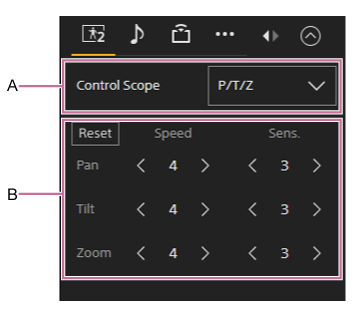
A: Auto control scope setup panel
Selects the auto control scope for PTZ framing from the following:
- [P/T/Z]: Control pan/tilt/zoom.
- [Pan/Tilt]: Control pan/tilt.
- [Pan]: Control pan.
B: Speed/sensitivity setup panel
Set the speed and sensitivity of PTZ auto framing. For details, see the following hints.
- [Reset] button: Press the button to restore the speed and sensitivity to the default values.
- [Speed]: Set separate speeds for pan/tilt/zoom to one of five steps (1 (slow) to 5 (fast)).
- [Sens.]: Set separate sensitivities for pan/tilt/zoom to one of six steps (0 to 5 (responsive)). When set to 0, the pan/tilt/zoom move until the specified composition is achieved, and once achieved the pan/tilt/zoom do not move.
Hint
- When the auto control scope for PTZ auto framing is set to [Pan/Tilt] or [Pan], you can operate the zoom using the framing control panel of the Web App or using the remote control with auto tracking left enabled.
- The speed sets the level of acceleration or deceleration when tracking a subject. The sensitivity sets how sensitive the camera is to detecting deviations from the configured composition.
- If a subject is not moving quickly (such as in a presentation), reducing the speed will result in smoother tracking.
- If a subject is moving quickly (such as in sports), increasing the sensitivity/speed will make it less likely to lose the subject.
- If extracting and using an image in a subsequent system, increasing the pan/tilt sensitivity will make it less likely for the subject to be cropped out.
- If a subject is not moving back and forth (for example, when sitting), reducing the zoom sensitivity will reduce fluctuations in the framing and increase stability.
Note
-
Framing may become unstable if you increase the speed or sensitivity in the following cases.
- Part of the subject is obscured.
- There are many people around the subject.
- Subject is in a complex pose.
TP1002273912
