


Setting the Pan/Tilt Operating Speed
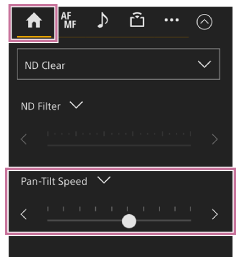
You can change the pan/tilt operating speed using the [Pan-Tilt Speed] slider in the camera control panel by operating the joystick in the framing control panel.
-
Press the
 (Main) tab in the camera control panel.
 -
Select the [Pan-Tilt Speed] slider from the list.
If the [Pan-Tilt Speed] slider is not displayed, select either of the two slider function selection buttons to display the slider.
-
Move the slider knob left or right.
Moving the knob to the left decreases the operating speed, while moving the knob to the right increases the operating speed.
Hint
- You can also use the [Pan-Tilt Speed] slider on the
 (PTZ) tab.
Note
- You can change the pan/tilt acceleration setting using [Pan-Tilt] – [P/T Acceleration] – [Ramp Curve] in the web menu or camera menu.
TP1001804494
