


Starting Auto Tracking of a Person after Restoring a Preset Position
You can automatically track a person who is detected within a specified framing when a preset position is restored.
Note
- After the restoration is completed, tracking does not start until a person is detected.
- Among the advanced settings for a preset position, the PTZ auto framing items are disabled in “Ball Sports (Basketball)” mode.
-
Set the [PTZ AFR] switch to the on position on the live operation screen.
For details PTZ auto framing, see “About PTZ Auto Framing.”
-
Press the image for the preset position for which you want to set auto tracking start.
The
 (Preset position menu) button appears at the top right of the image.
 -
Press the (Preset position menu) button and select [Edit…] from the displayed menu.
The setup screen for the selected preset position appears.
-
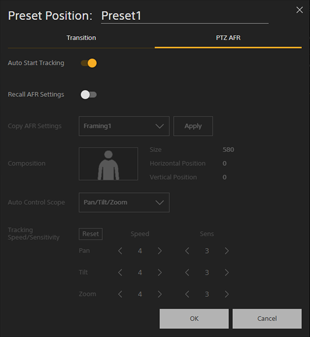
Press the [PTZ AFR] tab.
The PTZ auto framing setup screen for the selected preset position appears.
-
Set [Auto Start Tracking] to the on position and press the [OK] button.
The next time the preset position is restored, people detected within the framing will be tracked.
Hint
- If there are multiple people on the screen, the person closest to the center of the screen will be selected.
- If restoring a preset position is canceled, auto tracking of people will not start.
TP1002273907
