


Editing Preset Framing for PTZ Auto Framing
You can set the auto control scope for PTZ auto framing, and the speed and sensitivity during tracking in preset framing.
When a preset framing is recalled, these settings, along with the composition, are reflected in the PTZ auto framing.
-
Set the [PTZ AFR] switch to the on position on the live operation screen.
The preset framing control panel is displayed on the left side of the live operation screen.
-
Press the preset framing to recall.
The
 (Preset framing menu) button appears at the top right of the image.
 -
Press the (Preset framing menu) button and select [Edit…] from the displayed menu.
The preset framing setup screen appears.
-
On the preset framing setup screen, set the auto control scope for PTZ auto framing, and the speed and sensitivity during tracking.
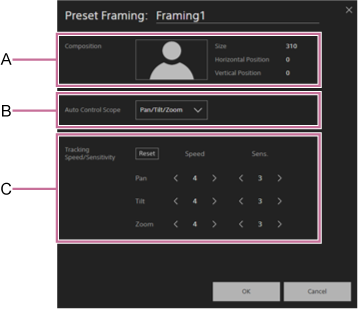
A: Composition display area
Displays the registered composition for the preset framing.B: Auto control scope setup panel
Selects the auto control scope for PTZ framing from the following:- [Pan/Tilt/Zoom]: Control pan/tilt/zoom.
- [Pan/Tilt]: Control pan/tilt.
- [Pan]: Control pan.
C: Speed/sensitivity setup panel
Set the speed and sensitivity of PTZ auto framing. For details, see the following hints.- [Reset] button: Press the button to restore the speed and sensitivity to the default values.
- [Speed]: Set separate speeds for pan/tilt/zoom to one of five steps (1 (slow) to 5 (fast)).
- [Sens.]: Set separate sensitivities for pan/tilt/zoom to one of six steps (0 to 5 (responsive)). When set to 0, the pan/tilt/zoom move until the specified composition is achieved, and once achieved the pan/tilt/zoom do not move.
Hint
- When the auto control scope for PTZ auto framing is set to [Pan/Tilt] or [Pan], you can operate the zoom using the framing control panel of the Web App or using the remote control.
- The speed sets the level of acceleration or deceleration when tracking a subject. The sensitivity sets how sensitive the camera is to detecting deviations from the configured composition.
- If a subject is not moving quickly (such as in a presentation), reducing the speed will result in smoother tracking.
- If a subject is moving quickly (such as in sports), increasing the sensitivity/speed will make it less likely to lose the subject.
- If extracting and using an image in a subsequent system, increasing the pan/tilt sensitivity will make it less likely for the subject to be cropped out.
- If a subject is not moving back and forth (for example, when sitting), reducing the zoom sensitivity will reduce fluctuations in the framing and increase stability.
Note
-
Framing may become unstable if you increase the speed or sensitivity in the following cases.
- Part of the subject is obscured.
- There are many people around the subject.
- Subject is in a complex pose.
-
Press the [OK] button.
The settings are applied.
