


Selecting the Input Audio to Output to Each Channel of the Camera using the XLR Handle Unit (ILME-FX5 only)
You can select which audio signals to output to each channel of the Multi Interface Shoe from either INPUT1, INPUT2, or INPUT3 on the XLR handle unit using the INPUT SELECT switches.
Note
- Set the number of channels to use in the menu on the camera.
- The microphone in the illustration is sold separately.
-
Set the INPUT SELECT switches.
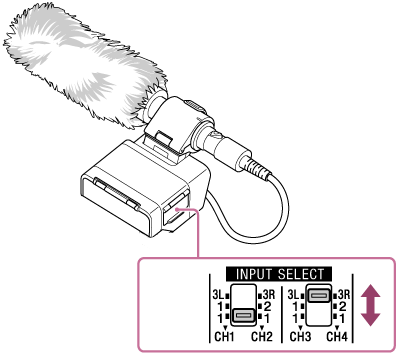
-
To output to CH1 and CH2
Set using the INPUT SELECT (CH1/CH2) switch.Used input connectors INPUT SELECT (CH1/CH2) switch setting Channels to output INPUT1 only 1/1 CH1: INPUT1
CH2: INPUT1INPUT1, INPUT2 1/2 CH1: INPUT1
CH2: INPUT2INPUT3 3L/3R CH1: INPUT3L
CH2: INPUT3R -
To output to CH3 and CH4
Set using the INPUT SELECT (CH3/CH4) switch.Used input connectors INPUT SELECT (CH3/CH4) switch setting Channels to output INPUT1 only 1/1 CH3: INPUT1
CH4: INPUT1INPUT1, INPUT2 1/2 CH3: INPUT1
CH4: INPUT2INPUT3 3L/3R CH3: INPUT3L
CH4: INPUT3R
-
For details on specific connection and configuration examples, see “XLR Handle Unit (ILME-FX5 only) Inputs and Multi Interface Shoe Output Channels.”
TP1002308575