


Zooming using the Zoom Lever
You can control the zoom using the zoom lever (A). The zoom speed varies with the force applied to the lever.
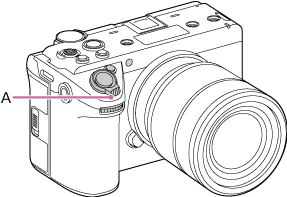
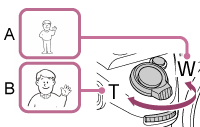
A: Press toward W (wide angle) to zoom out
B: Press toward T (telephoto) to zoom in
Hint
- You can select the type of zoom using [Technical] – [Zoom] – [Zoom Type] in the full menu.
- You can set the Clear Image Zoom operation using [Technical] – [Zoom] – [Clear Image Zoom Type] in the full menu.
Setting the speed of the zoom lever
Set the zoom speed of the zoom lever. You can set a 2-step zoom speed. Separate settings are available when in recording standby mode and when recording.
Set the zoom speed in the range [1(Slow)] to [8(Fast)] using [Technical] – [Zoom Lever Speed] in the full menu.
- [1st Zoom (Standby)]: Sets the zoom speed (1st level) for use in recording standby mode.
- [2nd Zoom(Standby)]: Sets the zoom speed (2nd level) for use in recording standby mode.
- [1st Zoom (Rec)]: Sets the zoom speed (1st level) for use during recording.
- [2nd Zoom(Rec)]: Sets the zoom speed (2nd level) for use during recording.
Hint
- Setting a faster zoom speed when in recording standby mode and slower for when recording will allow you to change the angle of view quickly when in recording standby mode and slowly when recording video.
Note
- The zoom speed does not change when using the zoom ring on a lens or the zoom lever on a power zoom lens.
- If the zoom speed is very fast, the zoom operation sound may also be recorded.
TP1002215278