


False Color
False color is a function that applies colors to the monitor output image according to the luminance level, making it easier to view the exposure when shooting.
To use the false color function, set [Technical] – [Exposure Assist] – [False Color] to [On] in the full menu. You can also assign [False Color] to an assignable button and press the button to turn the false color function on/off.
Note
- False Color applies colors to the luminance levels in the S-Log3 video output with [LUT] set to [Off] (EI gain is also not applied), regardless of the LUT application settings.
-
[False Color] is set to [Off] (fixed) when any of the following conditions is satisfied and cannot be set to [On].
- When [Technical] – [Test Signals] – [Color Bars] is set to [On] in the full menu
- When the shooting mode is set to [Custom]
- During recording (including at the start of recording if the false color display is on)
- When recording externally (HDMI output recording, RAW output recording)
- When switching to a screen that does not display false color
- When the streaming function is set to [On]
-
When the shooting mode is changed, [False Color] is set to [Off].
-
If any of the following are performed when [False Color] is set to [On], the setting is changed to [Off].
- Focus magnification
- Focus map display
Setting the destination for false color
Set the false color output destination using [Technical] – [Exposure Assist] – [Output Target] in the full menu.
| Setting | Description |
|---|---|
| [LCD Monitor/VF] | Displayed on the LCD monitor and viewfinder. |
| [HDMI] | Output to HDMI. |
Hint
- Either or both can be selected.
Showing/hiding the color scale
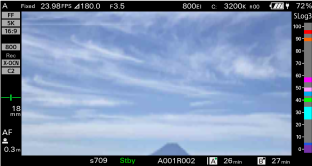
You can show/hide the color scale for false color when the false color function is enabled using [Technical] – [Exposure Assist] – [Color Scale] in the full menu.
Note
- The color scale for false color cannot be displayed when the LCD monitor is in information display mode.
- The color scale for false color is displayed on the LCD monitor, viewfinder, and HDMI output, regardless of the [Technical] – [Exposure Assist] – [Output Target] setting in the full menu.