


User Functions Screen
The user functions screen is a screen for quickly calling functions that you want to execute or set before or during shooting. You can assign frequently used functions or routine functions, and operate them like soft buttons from the Home screen, shooting screen, full menu screen, playback screen, or clip list screen.
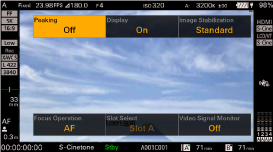
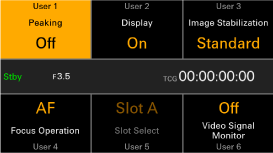
Press the USER button to display the user functions screen on the LCD monitor.
You can assign functions to [User 1] to [User 6] on the user functions screen using [Project] – [Assignable Button] – [<User 1>] to [<User 6>] in the full menu.
In video monitoring mode
In information display mode
TP1002295522