


Cleaning the Image Sensor ([Sensor Cleaning])
If dust or debris gets inside the unit and adheres to the surface of the image sensor (the part that converts light to an electrical signal), the dust or debris may appear in the image, depending on the shooting environment. If this happens, clean the image sensor immediately using the following procedure.
-
Check that the battery is sufficiently charged.
-
Select [Technical] – [Sensor Cleaning] – [Sensor Cleaning] – [Execute] in the full menu.
The image sensor vibrates for a short interval to shake off the dust.
-
Turn the unit off.
-
Remove the lens.
-
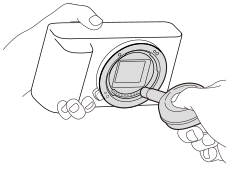
Use a commercially available blower to blow dust from the surface of the image sensor and the surrounding area.
-
Hold the camera slightly face downward so that the dust falls out.
-
-
Attach the lens.
Hint
- For details about how to check and clean the image sensor, visit the following URL.
https://support.d-imaging.sony.co.jp/www/support/ilc/sensor/index.php
Note
- When executing the cleaning mode, remove the lens with the camera turned on.
- Sensor cleaning cannot be executed if the remaining battery capacity is too low.
- Do not use a spray type blower as it may scatter water droplets inside the camera body.
- Do not put the tip of a blower into the cavity beyond the lens mount area, so that the tip of the blower does not touch the image sensor.
- When cleaning, do not blow too strongly. If the airflow is too strong, the inside of the unit may become damaged.
- If the dust or debris is not removed after cleaning using the procedure, contact your service representative.
- During cleaning, the image sensor emits a vibration noise. This is not a malfunction.
- Cleaning may be performed automatically when the unit is turned off.
TP1002274770