Setting the Audio to Record on the Unit
You can specify the audio to be recorded using the input connectors and menu of the unit.
The Multi Interface Shoe of the unit supports a digital audio interface.
Audio recording can be performed with reduced noise interference by transmitting digital signals between the unit and the XLR handle unit or digital Multi Interface Shoe compatible accessory device.
Hint
- Using the XLR handle unit or Multi Interface Shoe compatible accessory that supports 96 kHz and 32-bit float formats, you can record high-resolution audio with high sound quality or record audio in WAV format with minimal degradation as a separate file.
Audio input connectors and menu items
Internal microphone
External microphone
Multi Interface Shoe
[CH1 Input Select]
[CH2 Input Select]
[CH3 Input Select]
[CH4 Input Select]
Menus for setting the audio recording level
[CH1 Level Control] ([Auto] / [Manual])
[CH2 Level Control] ([Auto] / [Manual])
[CH3 Level Control] ([Auto] / [Manual])
[CH4 Level Control] ([Auto] / [Manual])
[CH1 Input Level]
[CH2 Input Level]
[CH3 Input Level]
[CH4 Input Level]
[Audio Input Level]
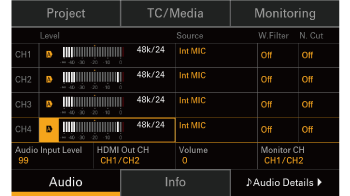
[Audio] screen in the menu
Press the MENU button to display the menu and press [Audio] (item 4) to display the [Audio] screen.