


Charging the Battery using the Supplied Charger
Prepare the following commercially available products that support USB PD (USB Power Delivery).
- 45 W (min) USB Type-C cable (USB-C® to USB-C)
- External power supply with 45 W (min) output
For details about supported output of USB Type-C cables and external power supplies, visit the following website.
-
Insert the battery in the battery charger, connect the battery charger to the external power supply (USB PD compatible) using a commercially available USB Type-C cable (USB PD compatible).
- The STATUS lamp (A) lights up before charging begins, and charging starts after it turns off. If the STATUS lamp does not light up and charging does not begin, check that the battery is inserted correctly.
- When charging two batteries simultaneously, it is possible to charge them using an external power supply with an output rating of 18 W to 45 W, but the charging time may be longer.
- If you use an external power source or USB Type-C cable other than those specified above, charging may not be performed correctly.
- When two batteries are inserted, both batteries are charged at the same time.
- Depending on the external power source you are using, the STATUS lamp may flash repeatedly before charging begins. However, once the STATUS lamp turns off and the charging status indicator lamps (B) turn on or flash, charging will proceed normally.
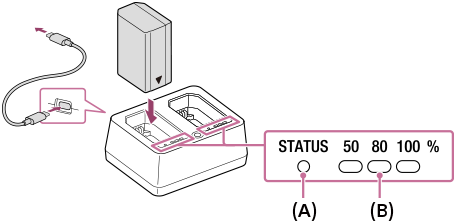
Charging status indicator lamps
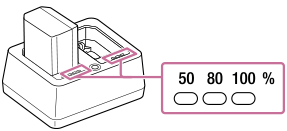
The charging status indicator lamps indicate the approximate charging status as shown in the following table (orange indicates a lit lamp).
| Charging status | Charging status indicator lamps |
|---|---|
| 0% to 50% |

|
| 50% to 80% |

|
| 80% to fully charged |

|
| Charging completed |

|
The charge level shown by the charging status indicator lamps and the percentages in the table above are rough guides.
Estimated charging time (full charge)
| Number of batteries to be charged | Full charge time (Output of the cable and power supply used) |
|---|---|
| 1 | Approx. 85 minutes (27 W or higher) |
| 2 | Approx. 115 minutes (45 W or higher) |
- The above charging time applies when charging a fully discharged battery pack at a temperature of 25 °C (77 °F) using the supplied charger.
- The charging time stated above may vary depending on the ambient temperature, the condition of the battery pack, and the USB Type-C cable or external power supply you are using.
- Charging a battery that hasn’t been used for a long time may take longer.
Checking the battery status
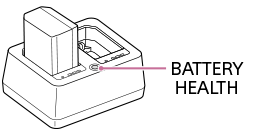
You can check the battery status using the STATUS lamp and charging status indicator lamps while the BATTERY HEALTH button is pressed.
| Battery status | Charging status indicator lamps |
|---|---|
| Good |

|
| Slightly deteriorated |

|
| Poor (replacement is recommended) |

|
Hint
- You can check the battery status on the [Battery] page of the [Info] category in the menu. Insert the battery pack to check in the camera.
Note
- When using an external power supply, use a nearby power outlet. If a problem occurs during operation, immediately disconnect the plug from the power outlet.
- Before charging, be sure to read “Notes on the Battery Pack and Charging the Battery.”
TP1002274773