


Multi-Function Dial
You can change the function of the multi-function dial of the unit.
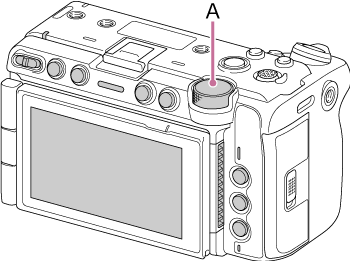
A: Multi-function dial
Assign a function to the multi-function dial using [Project] – [Multi Function Dial] – [Default Function] in the full menu.
| Setting | Description |
|---|---|
| [Off] | Disables the multi-function dial operation. |
| [ISO/Gain/EI] (default value) | Adjusts the gain. |
| [IRIS] | Adjusts the iris. |
| [Auto Exposure Level] | Adjusts the auto exposure level. |
| [Audio Input Level] | Adjusts the audio recording level. |
Note
- The setting is disabled while the menu is displayed.
TP1002218816