


Charging the Battery using a USB PD Compatible Device
Prepare the following commercially available products that support USB PD (USB Power Delivery).
- 27 W (min) USB Type-C cable (USB-C to USB-C)
- External power supply with 27 W (min) output (9 V, 3 A)
For details about supported output of USB Type-C cables and external power supplies, visit the following website.
-
Turn the camera off.
-
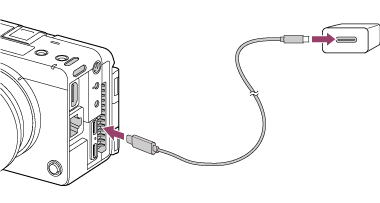
Connect a USB Type-C connector of the camera to the USB Type-C connector of the external power supply (USB PD compatible) using a commercially available USB Type-C cable (USB PD compatible).
You can charge the battery using the USB Type-C connector of either USB PORT 1 or USB PORT 2. The charging time is the same regardless of which connector you use.
Charging lamp of the camera (orange)
Lit: Charging
Off: Charging finished
Flashing: Charging error or charging paused temporarily because the camera is not within the proper temperature range
- The charging lamp turns off when charging is completed.
- If the charging lamp lights up and then immediately turns off, the battery pack is fully charged.
Hint
- While it is possible to charge the battery from a USB PD-compatible device with an output rating lower than 27 W, the charging time will be longer.
- The battery can also be charged using devices that do not support USB PD. Use a commercially available USB Type-C cable (USB-A to USB-C). To use an AC adaptor, use an AC adaptor with an output current rating of 1.5 A or higher.
The charging time is longer than with USB PD compatible devices. - You can check the battery status on the [Battery] page of the [Info] category in the menu. Insert the battery pack to check in the camera.
Note
- To use an AC adaptor, use a nearby power outlet. If a problem occurs during operation, immediately disconnect the plug from the power outlet. On models with a charging lamp, the power supply is not disconnected when the light turns off.
- If you turn the unit on while it is charging, power will be supplied from the power outlet enabling use of the unit, but the battery will stop charging.
- If the unit is connected to a laptop computer that is not connected to a power source, the laptop battery level will decrease. Do not leave it unattended for an extended period of time.
- Do not start, restart, wake from sleep mode, or shut down your computer while the unit is connected via USB. Doing so may cause a malfunction. Before performing these operations, disconnect the unit from the computer.
- Charging cannot be guaranteed with a custom-built computer, modified computer, or a computer connected via a hub.
- The unit may not operate correctly when other USB devices are used at the same time.
- Before charging, be sure to read “Notes on the Battery Pack and Charging the Battery.”
TP1002274775