


Inserting a Memory Card
This topic describes how to insert a memory card.
-
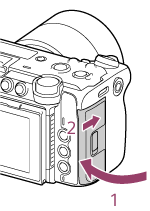
Slide the switch of the card slot cover in direction 1 and hold it, then slide the cover in direction 2 to open the cover.
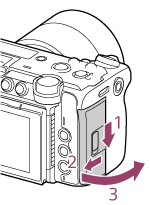
-
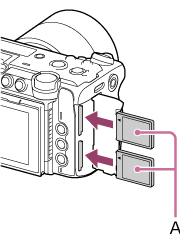
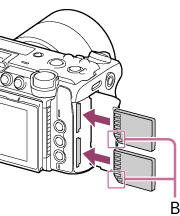
Insert a memory card.
- For CFexpress cards, the label (A) faces toward the LCD monitor side.
- For SD cards, the contacts face toward the LCD monitor side with the beveled corner (B) at the bottom.
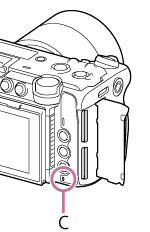
The access lamp (C) is lit red, then turns off when the access is finished.
Note
- If the access lamp flashes red continuously, temporarily turn off the unit, and remove and reinsert the memory card to see if that resolves the issue.
- For CFexpress cards, the label (A) faces toward the LCD monitor side.
-
Close the card slot cover.
Note
- The memory card, card slot, and image data on the memory card may be damaged if the card is forced into the slot in the incorrect orientation.
- When recording to memory cards inserted in both card slots A and B, insert memory cards in both card slots that are recommended for operation with the format of the recording.
- Using a memory card other than the recommended memory cards may cause problems with recording.
TP1002215272