


Left Side / Front Side
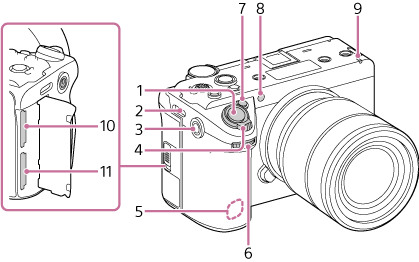
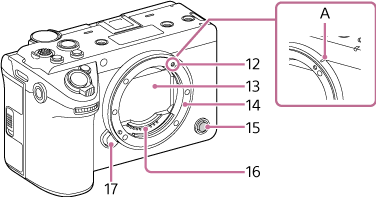
-
Grab button
You can assign specific functions to it.
- Shoulder strap (sold separately) attachment
-
Accessory screw hole
Compatible with 1/4-20 UNC screws
When attaching an accessory, use a screw of length 5.5 mm or shorter. If you use a screw that is longer than 5.5 mm, you will not be able to firmly secure the accessory to the unit, and the unit may be damaged.
- Zoom lever
-
Wireless LAN antenna (built-in)
Covering this area with your hand or other objects may interrupt the Wi-Fi communication.
-
Assignable Dial
Adjusts the iris, gain value, and other settings.
- Assignable button 1
-
Visible light + IR sensor
Note
- Do not obscure with your hands while shooting.
-
Recording/tally lamp (front)
Lights up when recording starts. Flashes when the remaining capacity on the memory card is low.
- CFexpress Type A/SD card slot (SLOT A)
- CFexpress Type A/SD card slot (SLOT B)
-
Mounting index
The lens mount has a bar-shaped protrusion (A) on its side. Use this as a guide when attaching a lens.
You can attach an A-mount lens (sold separately) using an LA-EA3/LA-EA4/LA-EA5 mount adaptor (sold separately).
Note
- Manual focus only is supported.
- In-body image stabilization is available.
-
Image sensor
Note
- Do not touch directly with your hands.
- Mount
- Assignable button 6
-
Lens signal contacts
Note
- Do not touch directly with your hands.
- Lens release button