


Shooting Screen / Playback Screen
In video monitoring mode, during shooting (recording or recording standby) and during playback, the shooting screen and playback screen that show the status and settings of the unit are displayed around the image on the LCD monitor and external monitor.
In information display mode, various information and settings are displayed on the LCD monitor, while the shooting screen and playback screen are displayed on the external monitor. To display the settings on the shooting screen and playback screen, set [Monitoring] – [Info. Disp.] to [On] in the menu beforehand.
Note
- You can select to show/hide each item independently. To display the recording mode, slot A/B, operation status, and interval recording interval time at all times, set [Monitoring] – [Display On/Off] – [Rec/Play Status] to [Always On] or [On] in the full menu.
Items marked with an asterisk* indicate items that cannot be displayed on the external monitor in information display mode.
Information displayed on the screen while shooting
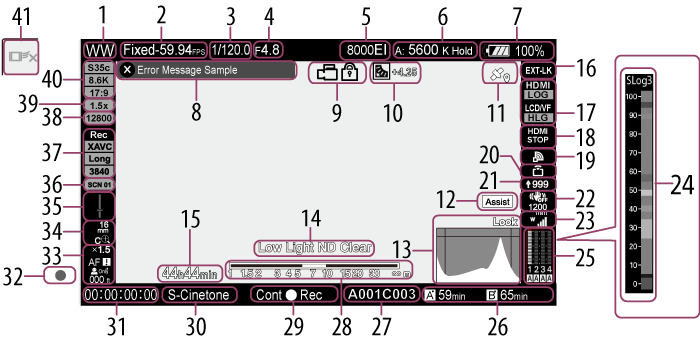
- Camera ID indicator
-
Recording format indicator (frame rate and project frame rate)
[Fixed] is displayed when [Shooting] – [FPS] – [Fixed/Variable Select] is set to [Fixed] in the full menu.
- Shutter indicator
-
Iris indicator
Displays the iris position (F-number).
-
Gain indicator
In custom shooting mode, it displays the gain value or ISO value. In [Flexible ISO] shooting mode, it displays the ISO value.
In [Cine EI] / [Cine EI Quick] shooting mode, it displays the EI value.
Display Meaning 
Auto mode 
Temporary adjustment mode -
White balance mode indicator
Display Meaning
Auto mode ATW Hold Auto mode paused A: Memory A mode B: Memory B mode C: Memory C mode D: Memory D mode E: Memory E mode F: Memory F mode G: Memory G mode H: Memory H mode -
Power status indicator
Displays the remaining battery charge.
An icon (
 ) indicating the USB power supply appears next to the battery indicator when using a USB power supply.
Display Meaning 
81% to 100% 
51% to 80% 
21% to 50% 
1% to 20% 
0% - Warning and error message display
- Key lock status indicator
-
Auto exposure adjustment operating mode and level indicator
Display Meaning 
Backlight mode 
Standard mode 
Spotlight mode -
GPS status indicator
Display Meaning 
Location data is within the validity period. 
Location data is outside the validity period. 
Location data linking is not possible due to invalid settings. -
Gamma display assist indicator*
Displays the gamma display assist status. The gamma display assist function can be shown/hidden using an assignable button assigned with [Gamma Display Assist].
-
Video signal monitor display
Displays a waveform, vectorscope, and histogram.
The orange line indicates the set value of the zebra level.
In log shooting mode, the monitor target LUT application status is displayed above the display. When [LUT Off] is selected, the color gamut setting is displayed. When [LUT On] is selected, “Look” is displayed regardless of the applied LUT type.
- Video level warning indicator*
- Interval recording interval display
-
Timecode external lock indicator
Displays “EXT-LK” when locked to the timecode of an external device.
-
Output look indicator
Displays the look destination and look name.
-
HDMI remote recording mode indicator
Displays the operating status in HDMI remote recording mode.
-
Network status indicator
Displays the network connection status as an icon.
-
Upload indicator/remaining files indicator
-
Streaming status indicator
Display Meaning 
Streaming transmitting status 
Switching to streaming transmitting status 
Streaming not transmitting status due to an error - Image stabilization mode indicator
-
UWP-D series status indicator
Displays the RF level signal strength as an icon when a UWP-D series device is connected to the MI shoe configured for digital audio transfer.
-
Exposure assist color scale indicator
Displays the exposure assist display color scale.
Set [Technical] – [Exposure Assist] – [Color Scale] to [Enable] in the full menu.
-
Audio level meter display
Displays the audio level of CH1 to CH4.
-
Memory card remaining capacity indicator
Display Meaning 
Mounting/mount status ([Media(A)]) 
Mounting/mount status ([Media(B)]) 
Recording active status indicator 
Playback active status indicator (“●” displayed on top right of media icon) 
Proxy recording indicator A
 (Write-protected) icon appears if the memory card is write-protected.
 -
Clip name display
Displays the name of the clip being recorded or to record next.
- Depth-of-field indicator
-
Recording mode, slot A/B status, operating status indicator
Display Meaning Stby Recording standby  Rec
RecRecording -
Look name display
Displays the selected look.
- Time data display
- Focus indicator
-
Focus mode indicator
Display Meaning Focus
Hold[Focus Hold] mode MF MF mode AF AF mode Full
MFFull MF mode 
Realtime tracking AF mode Subject recognition AF (AF /  / Only /
  /
/  /
/  /
/  / /
/ /  )
)
Human detection icon Only Human only detection AF icon
Human only detection AF icon (Saved tracking face)
Animal detection icon
Bird detection icon
Animal/bird detection icon
Saved tracking face icon
AF paused icon1) 1)Displayed during auto focus operation when auto focus operation cannot continue and temporarily stops. The icon disappears when the cause for stopping auto focus operation is resolved and then auto focus operation resumes.
-
Zoom position indicator
Displays the zoom position in the range 0 (wide angle) to 99 (telephoto) (if a lens that supports zoom setting display is attached).
It can also be changed to a bar display or focal length display.
The following items are added to the display when Clear Image Zoom is enabled.
Display Meaning 
Clear Image Zoom is enabled Magnification value When using Clear Image Zoom -
Spirit level indicator
Displays the horizontal tilt in ±1° increments up to ±15° in landscape orientation or up to ±10° in portrait orientation.
- Look name display
-
Recording format (picture size/codec) indicator
Displays the name of the format and picture size for recording on the memory cards.
- Base sensitivity indicator / Base ISO indicator
- Anamorphic de-squeeze ratio indicator
- Imager mode indicator
- Realtime tracking AF stop button
Information displayed on the screen during playback
The following information is superimposed on the playback picture.
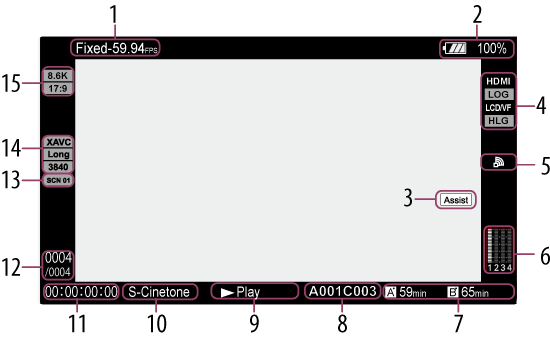
- Playback format indicator (frame rate and project frame rate)
- Power status indicator
- Gamma display assist indicator*
- Output look indicator
- Network status indicator
- Audio level meter display
- Memory card indicator
- Clip name display
- Playback status indicator
- Look name display
- Time data display
- Clip number / Total number of clips indicator
- Look name display
- Playback format (picture size) indicator
- X-OCN image size indicator
Icons
Network connection icons
| Network mode | Connection status | Icon |
|---|---|---|
| Access point mode | Operating as an access point |

|
| Access point operation error |
 (Icon flashing) (Icon flashing) |
|
| Station mode | Wi-Fi connected Wi-Fi signal strength (4 levels) |

|
| Wi-Fi disconnected (including when establishing connection) |
 (Icon flashing) (Icon flashing) |
|
| Wi-Fi connection error |
 (Icon flashing) (Icon flashing) |
|
| Wired LAN | Wired LAN connected |

|
| Wired LAN disconnected |
 (Icon flashing) (Icon flashing) |
|
| Wired LAN error |
 (Icon flashing) (Icon flashing) |
|
| USB tethering | USB tethering connected |

|
| USB tethering disconnected |
 (Icon flashing) (Icon flashing) |
|
| USB tethering error |
 (Icon flashing) (Icon flashing) |
|
| Bluetooth | Bluetooth function on |

|
UWP-D series icons
| Transmitter status | Receive status | Icon |
|---|---|---|
| Power off | Not receiving |

|
| Normal transmit status | Receiving |
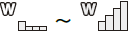
(4-level signal strength indicator) |
| Muting status | Receiving (muted) |

|
| Remaining battery capacity warning status | Receiving |

(Icon flashing) |
| Muting and remaining battery capacity warning status | Receiving |

(Icon flashing) |