


Recording Video Intermittently (Interval Rec)
The Interval Rec function allows you to capture video at regular intervals to internal memory of the unit. This function is an effective way to shoot slow-moving subjects. When you start recording, the unit automatically records a specified number of frames ([Number of Frames]) at a specified interval time ([Interval Time]).
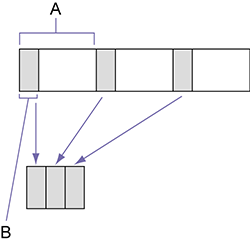
A: Shooting interval ([Interval Time])
B: Number of frames recorded per take ([Number of Frames])
Note
- Configurable only when [Codec] is set to a codec other than X-OCN.
- Only one special recording function, such as Interval Rec, can be used at any one time.
- If another special recording function is enabled while Interval Rec is in use, Interval Rec is automatically released.
- Interval Rec mode is automatically released after changing system settings, such as the video format.
- Interval Rec settings cannot be changed during recording or playback, or when the clip list screen is displayed.
To set Interval Rec
Set [Project] – [Interval Rec] – [Setting] to [On] in the full menu.
When the unit is turned off, Interval Rec mode is released, but the [Number of Frames] and [Interval Time] settings are retained. You do not need to set them again the next time you shoot in Interval Rec mode.
To shoot using Interval Rec
Press the record START/STOP button to start recording. “Int  Rec” and “Int Stby” appear alternately in the viewfinder.
To stop shooting
Stop the recording.
When shooting ends, the video data stored in memory up to that point is written to the media.
To exit Interval Rec mode
Set [Project] – [Interval Rec] – [Setting] to [Off] in the full menu. Or turn the unit off.
Limitations during recording
- Audio is not recorded.
- Reviewing the recording (Rec Review) is not possible.
If the unit is turned off
- If the power of the unit is turned off, the media is accessed to record the images stored in memory up till that moment, and then the power turns off automatically.
- If power is lost because the battery was removed, the DC power cord was disconnected, or the power was turned off from the AC adaptor, then the video and audio data shot up to that point may be lost (maximum 10 seconds). Care should be exercised when exchanging the battery.