


Synchronizing Timecode with an External Device
You can synchronize the timecode of the unit with an external device. A VMC-BNCU1 dedicated adaptor cable (sold separately) is required to connect the USB PORT 2 connector of the unit to the BNC output connector of a commercially available BNC cable.
Locking to the timecode of another device
- Set the external device that will be the timecode source to a mode where the timecode output is continuously updated.
-
Set [TC/Media] – [Timecode] in the full menu as follows.
[Mode] – [Preset]
[Run] – [Free Run]
- Set [TC/Media] – [Timecode] – [USB Timecode] to [On(PORT2)] in the full menu.
- Press an assignable button assigned with [DURATION/TC/U-BIT] to display the timecode on the screen.
-
Connect the BNC output connector of the BNC cable (A) to the USB Type-C connector (USB PORT 2) of the unit using the VMC-BNCU1 timecode adaptor cable (sold separately) (B).
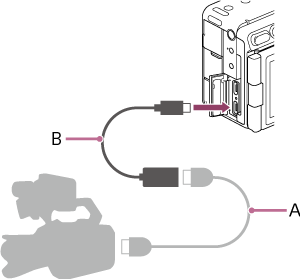
The timecode generator of the unit acquires lock with the reference timecode, and “EXT-LK” is displayed on the screen.
Once about ten seconds have elapsed after the timecode locks, the external lock state is maintained even if the external reference timecode source is disconnected.
Note
- When the timecode locks, the timecode of the unit instantly acquires lock with the timecode of the external device and the timecode value of the external value appears in the timecode display area. However, do not start recording immediately. Wait for a few seconds until the timecode generator stabilizes before recording.
- If the frequency of the reference timecode and the frame frequency on the unit are not the same, lock cannot be acquired and the unit will not operate properly. If this occurs, the timecode will not acquire successful lock with the external timecode.
- When synchronizing the timecode, an offset of about one frame may occur. If the unit is used for an extended period without an external reference timecode connection, the timecode may drift significantly from the reference timecode.
To release the timecode lock
Change the [TC/Media] – [Timecode] setting in the full menu.
The timecode lock is canceled when the project frame rate is changed or if you start shooting after [Shooting] – [FPS] – [Fixed/Variable Select] is set to [Variable] in the full menu.