


Rec. Media Settings (still image/movie): Auto Switch Media Card
If a memory card in use becomes full or you have forgotten to insert a memory card into a slot, you can record images to the other memory card.
- MENU →
 (Shooting) → [Media] → [
 Rec. Media Settings] → [Auto Switch Media Card] → desired setting.
Menu item details
- On:
- The camera automatically starts recording on the other memory card when a memory card in use becomes full or if you have forgotten to insert a memory card.
- Off:
- The camera does not perform [Auto Switch Media Card].
How the camera switches the memory card slot in use
This section explains how the recording slot changes when memory cards are inserted into both slot 1 and slot 2 and [Auto Switch Media Card] is set to [On] during shooting.
- When recording both still images and movies on a single memory card
When images cannot be recorded to the memory card in use, the settings for [ Recording Media] and [
 Recording Media] change automatically and images are recorded to the other memory card.
When the other memory card becomes full after switching, the camera starts recording in the former slot again.
Example: When [Recording Media] and [Recording Media] under [Rec. Media Settings] are both set to [Slot 1]
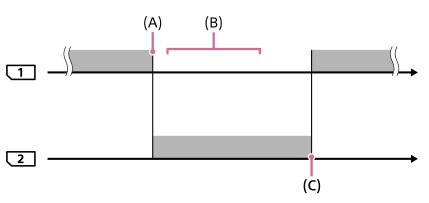
 : Recording images
(A): Recording is no longer possible on the memory card in slot 1 (due to lack of capacity, etc.).
(B): The memory card is replaced with a recordable one.
(C): Recording is no longer possible on the memory card in slot 2 (due to lack of capacity, etc.).
- When recording the same image simultaneously to two memory cards
After either of the memory cards becomes full, images are recorded to the other card.
When you replace the full memory card with a recordable memory card, the camera is once again able to simultaneously record images with the selected setting.
Example: [Recording Media] and [Recording Media] under [Rec. Media Settings] are both set to [Simult. Recording]
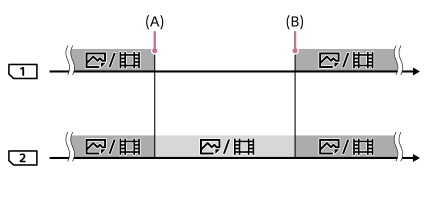
: Images are recorded simultaneously to memory cards in slots 1 and 2.
 : Images are recorded only to the memory card in slot 2.
(A): Recording is no longer possible on the memory card in slot 1 (due to lack of capacity, etc.).
(B): Replace slot 1 with a recordable memory card.
- When images are sorted and recorded onto two memory cards
When either of the memory cards becomes full, the camera starts recording to the other memory card in both the RAW and JPEG/HEIF formats.
When you replace the full memory card with a recordable memory card, the camera is once again able to record the two types of images separately with the selected setting.
Example:
- When [Recording Media] under [Rec. Media Settings] is set to [Sort Recording]
- When [File Format] is set to [RAW] for slot 1 and [JPEG] for slot 2
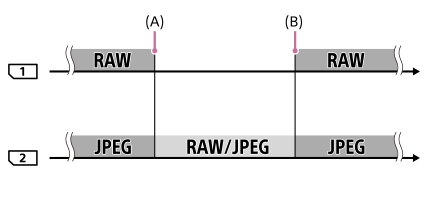
: Images are sorted and recorded in slots 1 and 2.
: All images are recorded to slot 2.
(A): Recording is no longer possible on the memory card in slot 1 (due to lack of capacity, etc.).
(B): Replace slot 1 with a recordable memory card.
Hint
- Images are recorded to the memory card in the slot displayed on the monitor with an arrow symbol. After the camera switches the slot using [Auto Switch Media Card], replace the memory card in the former slot with a recordable memory card.
- When recording both still images and movies on a single memory card, the settings for [Recording Media] and [Recording Media] change automatically as the slot switches. If you want to record on the slot in use before switching, select the desired slot with [Recording Media]/[Recording Media].
- If you want to record with the settings with [Recording Media] and [Recording Media], set [Auto Switch Media Card] to [Off].
- When [Auto Switch Media Card] is set to [On], the setting for [Disp Set of Multi Media] will be [All Slots], and the playback target will be the memory cards in all slots.
- When [Auto Switch Media Card] is set to [On] and the recording medium automatically switches from slot 1 to slot 2 while shooting still images, a folder is created in slot 2 with a number that is a continuation of the number last recorded in slot 1.